
Mobile browser
No installation. Open the site in Chrome, Safari or another modern browser and log in.

Play casino games, live tables and sports from your phone, either in the browser, with the Android APK or as a home screen web app on iPhone.
18+ · Play responsibly
Many players open the platform on a phone, so we designed the mobile experience with the same care as the desktop version. You have three ways to play on the go: directly in the mobile browser, through the Android APK that you install from our site, or as a progressive web app (PWA) added to the home screen of an iPhone or iPad. All three use the same account, the same balance and the same cashier, so you can start a session on your phone and continue it on a laptop without losing anything. The Avvabet apk is offered for Android, while iPhone users add a home-screen shortcut.
Whichever option you choose, the content is the same: the full casino lobby with slots, Megaways and jackpot titles, the live dealer casino, crash games such as Aviator and Spaceman, and the sportsbook with live betting. Promotions, deposit limits and account settings follow you across devices, because they are stored in your account, not on the phone.
No installation. Open the site in Chrome, Safari or another modern browser and log in.
An installable package from our site with a home screen icon and a full-screen layout.
A web app added to the home screen through Safari, opening full screen like a native app.
The installable versions are not distributed through third-party file sites. To stay safe, download the package only from the official site or follow the steps below from your own account, and ignore links shared in messages or social networks. If you do not have an account yet, the registration guide shows how to sign up in a couple of minutes. Every route opens the same Avvabet mobile casino with the same balance and history.
Whether you use the Avvabet download for Android or stay in the browser depends on your habits. You do not have to install anything to play on your phone. The mobile site adapts to your screen size and gives you access to every section. The installed versions add convenience: an icon on the home screen, a full-screen layout without the browser's address bar and a faster return to the lobby. Here is how the options compare.
| Feature | Mobile browser | Android APK | iPhone PWA |
|---|---|---|---|
| Installation | None | Download and install the package | Add to home screen from Safari |
| Home screen icon | Bookmark only | Yes | Yes |
| Full-screen layout | Browser bar visible | Yes | Yes |
| Storage used | Browser cache only | A small installed package | Very little |
| Updates | Always current | Prompted in the app or by a new download | Loaded automatically from the site |
| Access to games and cashier | Full | Full | Full |
For most players the choice comes down to habit. If you play now and then, the browser is enough. If you open the casino often, an installed version saves time, and it keeps your sessions separate from your everyday browsing. The Avvabet mobile experience is identical in terms of content and account features, so you are not giving anything up by staying in the browser.
One practical difference concerns notifications. Where your device and settings allow it, the installed versions can show reminders about promotions or account messages. You decide whether to allow them, and you can turn them off at any time in your phone's settings.
The Avvabet apk is not listed on Google Play; app stores restrict real-money gambling apps in many countries. Android phones can install packages from outside the Play Store once you allow it for the browser you use. The installation takes about as long as any regular app, and you only need to do it once; later updates are offered inside the app or through a new download from the site. After installation, the app opens in full screen with optional notifications.
Visit the site in Chrome or another browser on your Android phone and open the menu.
The APK file is downloaded to your phone. Your browser may warn that this type of file can be harmful; this is a standard message for any package from outside the store.
When asked, allow your browser to install unknown apps. On most phones this is under Settings, Apps, Special access, Install unknown apps.
Open the downloaded file from the notification bar or the Downloads folder and tap Install.
Open the new icon on your home screen and log in with your usual details.
For extra safety, you can switch the unknown apps permission off again after the installation.
If the installation fails, check that you have enough free storage, that the download completed fully and that the file came from our site. An interrupted download is the most common reason for a "package appears to be invalid" message; deleting the file and downloading it again usually solves it. Some phones with strict security settings also ask you to confirm the installation twice.
Keep the Avvabet app updated. When a new version is available, you will see a prompt, or you can download the latest APK from the site and install it over the old one. Your account data stays on our servers, so updating or reinstalling does not affect your balance or history.
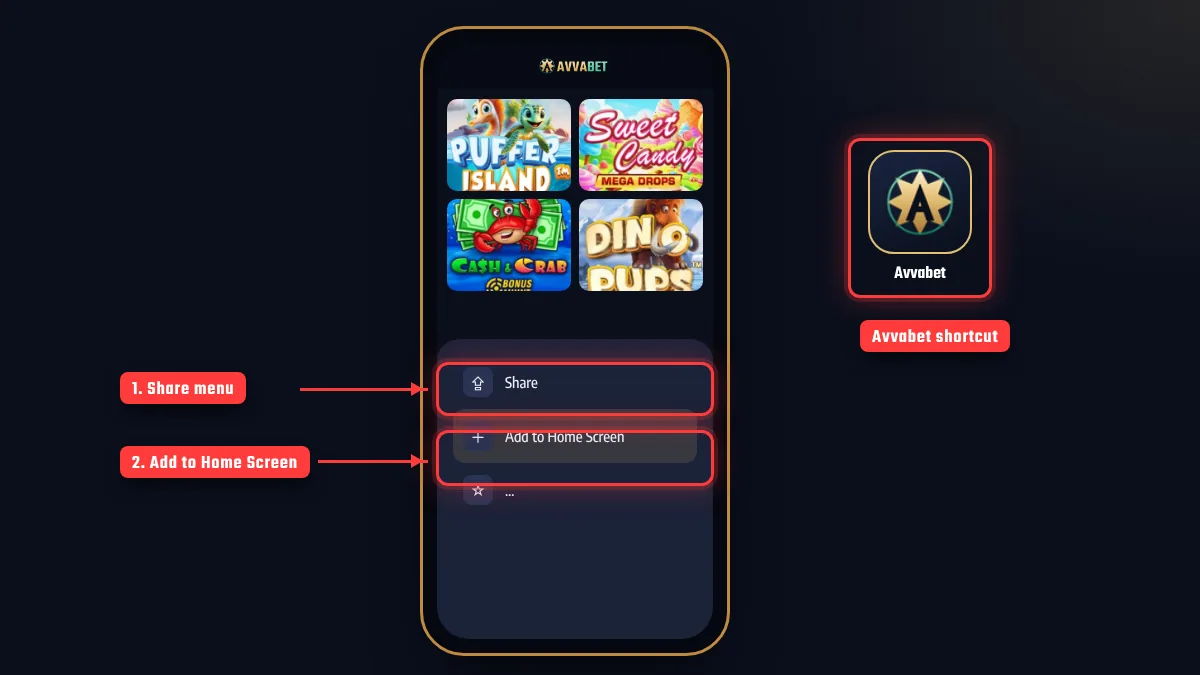
On iPhone no Avvabet download is needed: the Safari shortcut does the same job. The shortcut opens the Avvabet mobile casino in full screen, just like an installed app. On iPhone and iPad we offer a progressive web app instead of a store download. A PWA is a web app that you add to your home screen through Safari. It opens full screen, has its own icon and behaves much like a native app, while always loading the latest version of the site, so there is nothing to update manually.
Visit the official site in Safari. The home screen option is available in Safari on all current iOS versions.
Tap the share icon, the square with an arrow, at the bottom or top of the screen.
Scroll down the menu and choose Add to Home Screen, then confirm the name.
Open the new icon. The site loads full screen without the Safari address bar.
Sign in with your details. You can let your device keychain remember them if you wish.
The PWA takes up very little space, because it does not store the game files on your phone. Games load from the providers' servers each time you open them, just as they do in the browser. If the icon ever stops working, remove it from the home screen and add it again from Safari; your account is not affected.
The mobile lobby is built for one-handed use. The main categories sit in a scrollable bar at the top, the search field is always within reach and a bottom menu gives quick access to the casino, the sportsbook, promotions and your account. Game tiles are large enough to tap accurately, and the info panel on each tile shows the provider and the game type before you open it. You can browse the full catalog on the games page.
Speed matters on mobile, especially on cellular data. The interface loads the lobby first and the game files only when you open a game, which keeps data use low while you browse. Live dealer streams use the most data, so on a limited plan it makes sense to play them over Wi-Fi. If a game freezes after a network drop, reopen it from the lobby: rounds that were already in progress are settled by the game and appear in your history.
Account tools are just as accessible as the games. Deposit limits, session reminders and time-outs are in the account settings of the Avvabet mobile interface, and they apply to your account on every device: a lower limit takes effect immediately, while an increase follows a cooling-off period. You can read more about them on our responsible gaming page.
The cashier on your phone offers the same methods as on desktop, filtered by your country and currency. You can top up your balance, request a payout and check the status of every transaction without leaving the app. Details about methods, limits and processing stages are on the payments page. Update the Avvabet apk only from our own domain; files from third-party sites are a security risk.
All traffic between your phone and our servers is encrypted, in the browser, the APK and the PWA alike.
Protect your phone with a PIN, fingerprint or face unlock so that no one else can open your account.
Avoid making payments on open public Wi-Fi. Use your mobile data or a trusted network instead.
When paying with crypto from a wallet app, copy the address and network from the cashier exactly as shown.
Banking apps and wallet apps often ask you to confirm a payment with a one-time code or a push approval. On a phone this step is quick, because you can switch between our cashier and your banking app, but make sure you complete it; otherwise the payment is not finished. If you are verifying your account for a first payout, you can photograph your documents with the phone camera and upload them in the verification section of your account. If the app slows down, reinstalling the latest version from the official Avvabet download page usually helps.
Never share your login details or one-time codes with anyone, including people who claim to be from our support team. Our live chat will never ask for your password. If you notice anything unusual on your account, change your password and contact support through the contact page. Payments in the Avvabet mobile casino use the same cashier and limits as on desktop.
On iPhone and iPad we offer a progressive web app. Open the site in Safari, tap Share and choose Add to Home Screen to get a full-screen icon.
Only from the official site, using the Android download button in the menu. Do not install packages from other sources.
No. The same login, balance, bonuses and settings work in the browser, the APK and the PWA.
Yes. The full cashier is available on mobile, with the methods and limits shown for your account and country.
Browsing the lobby uses little data. Slots use more when they load, and live dealer streams use the most, so Wi-Fi is recommended for longer live sessions.
Check free storage, allow installs from your browser, delete the file and download it again from the site. If the problem continues, contact live chat.
Mobile features, supported devices and download options can change. The current version is always available on the official site. Players must be 18+. Play responsibly, and if gambling stops being fun, GambleAware offers free, confidential support.

Caner Demir is an editor who covers online casinos and sports betting. He explains promotion terms, payment steps and game rules in plain language and keeps market regulation and player protection in view in every text. On this site he checks every page against the cashier screens, promotion cards and general terms, and updates the page date whenever a detail changes.